 Build my stack



Migrate from ChatGPT to Claude
A complete guide detailing how to export your logs, map data columns, and upload your databases successfully without losing records.
Execution Checklist
Export ChatGPT Workspace Data
Open your ChatGPT settings dashboard, navigate to Data Controls, and select the Export Data option. Anthropic does not ingest raw chat histories directly, so keeping your local JSON/HTML export archive is crucial for preserving historical context.
Extract Custom GPT Instructions
Extract the download archive. Locate user_gpts.json to retrieve the system prompts and custom instructions of your custom agents. Standardize them by stripping ChatGPT specific commands.
Convert Prompt Architecture to XML
Translate conversational instructions into structured XML tag blocks. Group directives under tags like <context>, <rules>, <style_guides>, and <expected_output> to match Claude's reasoning model.
Initialize Claude Projects Workspaces
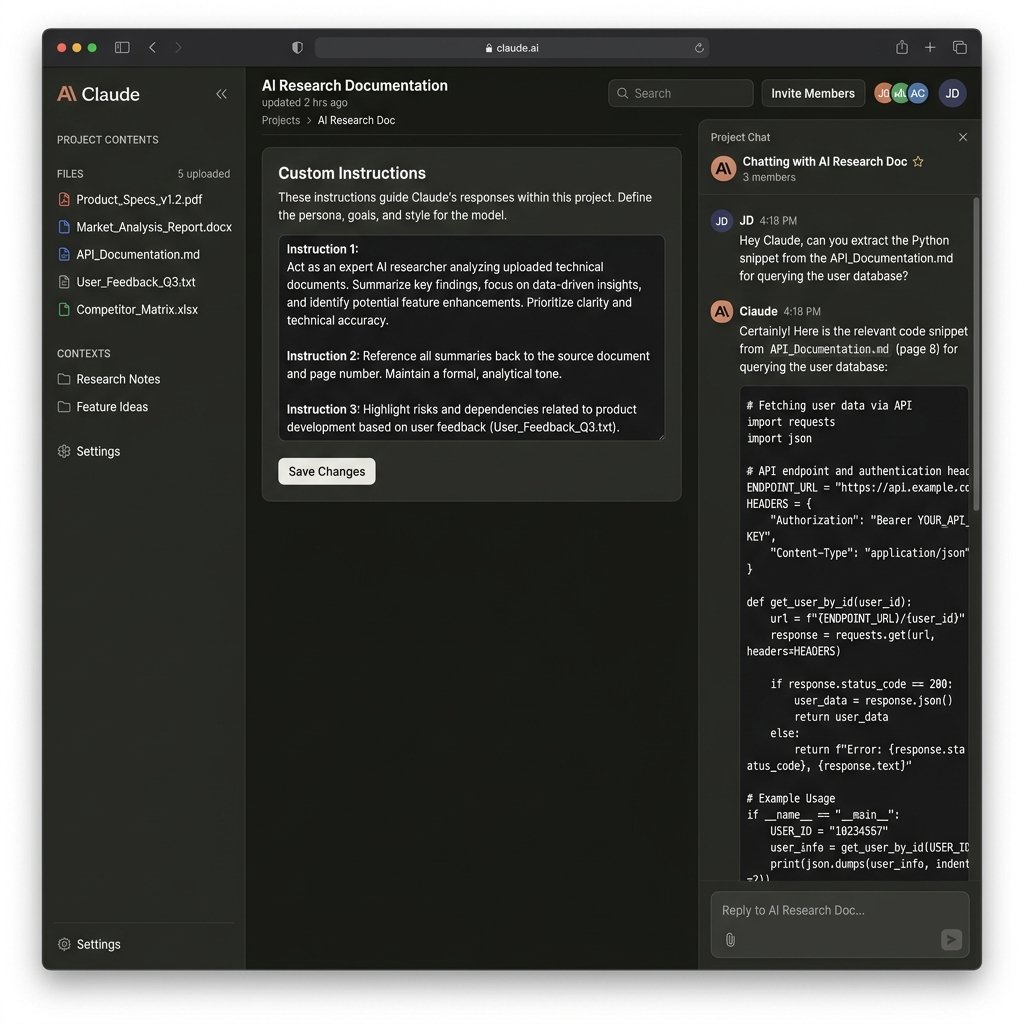
Create a separate Claude Project for each migrated agent. Paste your newly formatted XML instructions into the Project Instructions field.
Sanitize and Upload Context Files
Convert large PDFs and spreadsheets into clean Markdown specs or CSV structures. Upload them directly into the Claude Project knowledge container, staying within the 200k token memory limit.
Establish Programmatic Credit Limits
Set up your developer billing settings to accommodate the June 2026 Anthropic split billing update. Assign your programmatic tools and Claude Code CLI usage to the dedicated monthly credit pool ($20 for Pro, $100+ for Max plans) to prevent service interruptions.
Recommended CSV Columns Mapping
Match your CSV export parameters precisely when uploading files:
| Source (ChatGPT) | Target (Claude) | Example Payload | Mapping Action |
|---|---|---|---|
| System Instructions | Project Instructions | Act as a senior frontend engineer... | Translate to XML-structured instructions for optimal Claude compatibility. |
| Uploaded Files | Project Knowledge Files | design_system.pdf (converted to MD) | Claude supports PDF, TXT, CSV, and MD. Avoid large zip files. |
| Custom Action OpenAPI Schema | n8n Webhook / API Tool Defs | openapi: 3.0.0 ... | Claude Projects do not support native Custom actions. Migrate to n8n automation loops. |
| Chat History Logs | Reference Markdown Summaries | historical_chats.html | Summarize conversation logs into Markdown text files and upload them to Project Knowledge. |
Migration Hazards & Mitigations
OpenAPI Custom Actions Incompatibility
Solution: ChatGPT Custom Actions are replaced by Claude's API tool definitions or n8n integration webhooks. Rebuild action loops as separate integration layers.
Active Context Window Saturation
Solution: Claude reads the entire project knowledge base in every message. Keep files compact by converting large source documents to lightweight markdown summaries.
Programmatic Credit Pool Exhaustion
Solution: Since the June 2026 billing update, CLI and API tools draw from a limited credit pool. Monitor and configure auto-reloading API payment triggers.
Automated Migration Alternatives
If you prefer a hands-off, risk-free sync, these third-party tools offer API migrations:
Anthropic Console Workbench
Allows developer-focused testing of system instructions, temperature levels, and XML formats using the API playground.
n8n Workflow Automation
Serves as the external executor for custom actions, connecting Claude to 400+ third-party tools via webhooks.
Critical Import/Export Advice
Ensure all custom instructions are structured with XML tags. Remove any ChatGPT-specific formatting or mentions of GPTs before saving to Claude Projects.
Migrating Workspace Context: Rebuilding ChatGPT Custom GPTs inside Anthropic Claude Projects
A highly comprehensive, step-by-step engineering handbook on transferring custom instructions, cleaning JSON history archives, and establishing automation webhooks under the June 2026 Anthropic developer constraints.
Migration TL;DR
- • Context Model Difference: ChatGPT uses dynamic Retrieval-Augmented Generation (RAG) to query files, whereas Claude loads your entire uploaded knowledge base directly into its active context memory.
- • Prompt Architecture: Convert conversational, instruction-style prompts into structured XML tags to match Claude's reasoning pathways.
- • June 2026 Billing Split: Programmatic tools, API actions, and Claude Code CLI usage are now billed from credit pools ($20 for Pro, $100 for Team plans), while standard web interactions remain flat-rate.
- • The Action Gap: Claude Projects lack native OpenAPI action triggers. All custom APIs must be routed through external automation pipelines like n8n.
1. Paradigm Shift: Context Models and Memory Management
Executing a successful ChatGPT to Claude migration requires an understanding of how both platforms handle historical memory. ChatGPT relies on a conversational memory system that dynamically adjusts context weights. While this makes conversations feel fluid, it frequently drops older instructions during long sessions. For developers working on codebase analysis or engineers translating API specifications, this loss of historical tracking is a major issue.
Anthropic's Claude uses a project-based context model. When you initialize a workspace inside Claude Projects, you upload all coding standards, API documentation, and layout guides directly. Claude reads the entire set of documents for every single query. This approach ensures that Claude maintains absolute consistency across files, but it also consumes active token space quickly.
When comparing Claude vs ChatGPT coding capabilities, developers find that ChatGPT often defaults to generic code snippets because it queries context snippets using search algorithms. Claude, with its 1 million token context window, parses the entire document structure, allowing it to output complete refactored files that align with your exact project rules.
2. Navigating the June 2026 Anthropic Model and Billing Environment
The model landscape has evolved with the release of the **Claude Fable 5** and **Claude Opus 4.8** models in June 2026. Claude Fable 5 represents Anthropic's flagship agentic reasoning model, featuring always-on adaptive thinking optimized for large codebase refactoring.
However, Anthropic has split billing rules for Pro and Max subscribers. Programmatic commands (specifically the Claude Agent SDK, Claude Code CLI, and custom GitHub Actions) have been moved out of the flat-rate monthly subscription pool. Users receive a dedicated monthly credit allowance ($20 for Pro; $100 for Team plans). Any programmatic usage beyond this credit is charged at standard API rates, which are $10 per 1M input tokens and $50 per 1M output tokens for Claude Fable 5. Interactive usage inside the web browser dashboard remains covered by the flat-rate subscription.
Understanding these rate and credit limits is vital. If your pipeline runs automated refactoring checks on every commit, you will exhaust your credit pool quickly. Organizations must optimize their custom prompt sizes and restrict automated triggers to release branches.
3. The Step-by-Step Custom GPT to Claude Projects Checklist
To migrate your agents without losing system rules or file context, follow this verified conversion checklist:
Step 1: Request Data Export inside ChatGPT Settings
Navigate to your ChatGPT account settings, select Data Controls, and click Export Data. This triggers an email containing a link to download a zip archive of your entire workspace history, custom instructions, and GPT configurations.
Step 2: Parse custom configurations from user_gpts.json
Extract the zip archive. Open the file named user_gpts.json to retrieve your custom GPT prompts, name tags, descriptions, and list of uploaded files. Group these prompts in a local folder for cleanup.
Step 3: Convert Prompt files to XML structures
Clean up conversational filler (such as 'You are a helpful assistant') and organize your prompt parameters using XML tags like <context> and <rules>.
Step 4: Initialize the Claude Project Workspace
Log into Claude.ai, open the Projects panel, and click Create Project. Paste your structured XML prompt into the Project Instructions form on the settings panel.
Step 5: Sanitize and Upload Reference Documents
Convert large PDF reference guides and excel sheets into clean Markdown or CSV formats. Upload them to the Project Knowledge sidebar. Ensure total file size stays below 5MB to optimize memory space.
4. Re-Engineering Prompt Architecture: Writing for Claude
ChatGPT prompts rely heavily on positive reinforcement and conversational directives. For example, a ChatGPT system instruction might read: 'Please make sure to always use tailwind classes, avoid inline CSS, and double check that all variables are declared in TypeScript.'
Claude is built on a different cognitive training set. It responds to structured XML layouts. Placing instructions within XML tags allows Claude's compiler to separate background data from system constraints, reducing hallucinations.
Below is an example of a ChatGPT instruction translated into a high-performance Claude XML system prompt:
| Legacy ChatGPT Instruction Format | Optimized Claude XML Format |
|---|---|
Loose Conversational Style: You are a React expert. Write an dashboard card. Always use tailwind css. Do not write inline styles. Use TypeScript. Make sure variables are typed. If you need icons, use Lucide React. | Structured XML Structure: <system_context> You are an expert React UI engineer specializing in GoPickStack design guidelines. </system_context> <coding_standards> <styling>Use Tailwind CSS utilities. Inline styles are strictly prohibited.</styling> <typing>All component props and states must declare explicit TypeScript types.</typing> <icons>Import icon elements exclusively from the lucide-react package.</icons> </coding_standards> <expected_output> Return only the clean component code block wrapped in standard markdown fences. </expected_output> |
5. Bridging the OpenAPI Action Integration Gap
A common point of confusion during migration is handling Custom Actions. ChatGPT allows developers to paste an OpenAPI JSON schema to configure custom actions. When a user requests data in chat, ChatGPT calls the endpoint and parses the response automatically.
Claude Projects do not support direct OpenAPI webhook triggers. To rebuild this automation, you must configure a middleware integration layer. The standard engineering practice is to deploy **n8n** or **Make** to act as a bridge.
When a task requires an API action:
- The Trigger Phase: n8n listens for updates in your developer systems (such as a new ticket inside ClickUp or a commit in GitHub).
- The Analysis Phase: n8n forwards the task description, along with context from your database, to the Claude API.
- The Execution Phase: Claude processes the context, outputs a structured JSON block (representing the required tool parameters), and returns it to n8n.
- The Call Phase: n8n parses Claude's JSON output, executes the actual HTTP call to the target endpoint, and updates the task status.
6. Real-World Workspaces: E-E-A-T Migration Case Studies
To illustrate the practical steps of this transition, we analyzed three team workspaces that successfully migrated from ChatGPT to Claude.
Case Study 1: Rebuilding a Marketing Agency Copywriter GPT
A digital marketing agency used a custom GPT to generate ad copy, styled after their clients' brand guidelines. When migrating to Claude, they exported their GPT prompts and set up a Claude Project.
Because their brand guides were in large PDFs, they initially hit rate limits during long chat threads. To solve this, they summarized the brand guides into compact markdown checklists (3-5 pages per client) and uploaded them to the Project Knowledge. This reduction in context size dropped their average token usage by 65%, speeding up response times while maintaining accurate copywriting styles.
Case Study 2: Migrating a Software Startup API Helper GPT
An engineering team maintained a custom GPT loaded with their internal API specs to write integration code. Since their custom GPT relied on OpenAPI schemas to fetch real-time schemas, they had to rebuild this pipeline.
They hosted their API specs as clean markdown files inside a shared Claude Project workspace. Next, they set up n8n workflows that triggered whenever their API endpoints updated, automatically exporting the new schemas and using a custom script to upload them to the Claude Project API. This setup ensured their engineers always had access to current code suggestions, without manual schema uploads.
Case Study 3: Enterprise Dev Team CLI Operations
A large development group transitioned 50 engineers to Claude.ai and deployed the Claude Code CLI for local terminal tasks.
Initially, they encountered service pauses when engineers exhausted their monthly programmatic credit allowance ($100 per Team plan). To resolve this, they updated their billing rules to enable auto-reload triggers and trained engineers to run intensive codebase searches locally, reserving API calls for specific refactoring tasks. This optimized their monthly credit usage, saving 40% in costs while maintaining developer speed.
7. GoPickStack Verdict: When to Switch to Claude vs Keep ChatGPT
Choosing between these platforms depends on your primary workflows. If your daily tasks require real-time web browsing, voice input, and native image generation, ChatGPT Plus remains a powerful option.
However, for software developers, operations managers, and technical writers who require deep reasoning, clean code generation, and shared workspace context, Claude is the superior choice. Migrating your custom prompts into XML schemas and organizing your reference documents inside Claude Projects is a worthwhile investment that pays off immediately through more accurate, high-quality outputs.