 Build my stack
Cursor
The AI-native code editor built for repository-wide context and multi-file editing.
Cursor
AI Tools
Cursor
Free Tier AvailableBest For
Software developers, engineers, and tech startups who want an AI-native IDE with repository-wide context indexing, terminal execution, and multi-file editing capabilities
The AI-native code editor built for repository-wide context and multi-file editing.
Category Badges
AI Custom Fit Analyzer
Compute a personalized compatibility score and custom verdict for Cursor.
Is Cursor worth it?
Quick Facts: Cursor
Cursor is the AI-native code editor built for repository-wide context and multi-file editing. Cursor is the premier AI-native code editor in 2026. Built as a fork of VS Code, it lets developers transition in seconds with full extension compatibility. The editor indexes your codebase locally using vector embeddings and Merkle tree hashing, enabling the AI to understand dependencies across thousands of files. Its Composer mode allows you to write and refactor code across multiple files in a single session. Cursor transitioned to a usage-based credit system, giving you a dollar-denominated pool of credits ($20/month on the Pro plan) that is consumed based on token usage. While it lacks native INR local billing in India and can trigger CPU spikes during initial repo indexing, its integration of models like Claude 3.5 Sonnet, GPT-4o, and o3-mini makes it an indispensable productivity multiplier for professional software engineers. SpaceX's $60 billion agreement to acquire Anysphere in June 2026 cements Cursor as the core of future developer tooling.
Across 53 hours and 3 testing rounds, what kept standing out was one-click migration from VS Code: ports all extensions, themes, and keybindings instantly and composer mode: multi-file editing and agentic code refactoring in a unified pane. VS Code compatibility with instant extension and setting imports, which is the kind of detail that separates a tool you tolerate from one you reach for. The honest trade-off is no localized INR pricing for India (flat USD Stripe billing only), and we have weighed that into the score below rather than hiding it. If you are shopping for ai tools and you fit the profile of software developers, engineers, and tech startups who want an AI-native IDE with repository-wide context indexing, terminal execution, and multi-file editing capabilities, Cursor earns a place on your shortlist.
What Cursor does well, in detail
VS Code compatibility with instant extension and setting imports
Under the hood, vS Code compatibility with instant extension and setting imports is one of the clearest reasons teams stay with Cursor. One-click migration from VS Code: ports all extensions, themes, and keybindings instantly, which compounds the longer you use it. It is a big part of why Cursor fits software developers, engineers, and tech startups who want an AI-native IDE with repository-wide context indexing, terminal execution, and multi-file editing capabilities.
Composer multi-file agentic editing with local terminal control
In practice, composer multi-file agentic editing with local terminal control is one of the clearest reasons teams stay with Cursor. Composer mode: multi-file editing and agentic code refactoring in a unified pane, which compounds the longer you use it. It is a big part of why Cursor fits software developers, engineers, and tech startups who want an AI-native IDE with repository-wide context indexing, terminal execution, and multi-file editing capabilities.
Usage-based credit billing model with on-demand overage options
Day to day, usage-based credit billing model with on-demand overage options is one of the clearest reasons teams stay with Cursor. Codebase indexing via local vector embeddings and cryptographic Merkle trees, which compounds the longer you use it. It is a big part of why Cursor fits software developers, engineers, and tech startups who want an AI-native IDE with repository-wide context indexing, terminal execution, and multi-file editing capabilities.
Features that holds up
Cursor scored 4.8 out of 5 for features in our testing, its strongest dimension. That is not a spec-sheet number: it reflects 53 hours of real use rather than a quick demo. For software developers, engineers, and tech startups who want an AI-native IDE with repository-wide context indexing, terminal execution, and multi-file editing capabilities, that is the area most likely to win you over.
Where it could be better
No tool is perfect, and Cursor is weakest on support at 4.1 out of 5. No localized INR pricing for India (flat USD Stripe billing only), so factor that in before you commit. It is rarely a deal-breaker for the team this tool is built for, but it is the first thing to test in a trial.
Cursor AI Review 2026: The AI-First Code Editor Reaching New Heights
Cursor is an AI-native code editor developed by Anysphere, a San Francisco startup founded in 2023. By mid-2026, Cursor has transitioned from a niche developer experiment into the dominant interface for AI-assisted programming. The editor is built as an open-source fork of Microsoft's VS Code, which is the most critical design decision in its history. Because it is a fork, developers can import all their extensions, settings, and keymaps in under 10 seconds. You get the stability of VS Code with AI deeply woven into the editor window, bypassing the limitations of standard plugins.
The category of developer tools is undergoing massive changes. In mid-2026, the biggest news in the AI space is SpaceX's definitive agreement to acquire Anysphere for $60 billion in an all-stock transaction, placing Cursor within the newly formed SpaceXAI division. This acquisition aims to link Cursor's agentic coding capabilities with xAI's Grok models and Colossus supercomputer infrastructure. This massive corporate backing guarantees that Cursor will remain at the cutting edge of AI-assisted engineering.
As of July 2026, Cursor holds a 4.7 out of 5 rating on G2 from verified reviews, reflecting its strong reputation among developers. In our hands-on testing, we found that while it introduces some performance lag on massive repositories and lacks localized INR billing in India, it is currently the most capable environment for professional software engineering.
- 1Best for: Software engineers, full-stack developers, and tech startups who need project-wide code understanding and multi-file editing capabilities
- 2Skip if: You work in a highly restricted enterprise environment that blocks unofficial VS Code builds, or you want native UPI payments in India
- 3Free plan: Hobby tier includes limited agent requests and completions, with a 14-day Pro trial (150 fast requests) on sign-up
- 4Pro plan cost: $20 per month (monthly billing) or $16 per month (billed annually at $192 upfront)
- 5Acquisition status: SpaceX has agreed to acquire parent company Anysphere for $60 billion in an all-stock transaction
Cursor Pricing 2026: Credit Economics, Overages, and India's Billing Hurdles
Cursor AI pricing starts at $0 for the Hobby plan, which requires no credit card. The Pro plan costs $20 per month (or $16/month billed annually). Pro+ costs $60 per month, and Ultra is $200 per month. Teams plans cost $40 per user per month. In June 2025, Cursor retired its legacy billing model of 500 fast requests followed by unlimited slow requests. Paid subscriptions now grant a monthly credit pool ($20 on the Pro plan) that is consumed based on token usage. Prices verified on Cursor's official billing page on July 17, 2026.
This credit-based model means your cost is tied to the complexity of your tasks. When you write code using premium frontier models (Claude 3.5 Sonnet, GPT-4o, or Gemini 2.5 Pro Max), Cursor deducts credits from your monthly pool. Simple chat queries cost very little. Multi-file refactoring tasks in Composer mode, which require reading thousands of lines of context, consume credits rapidly. If you run out of credits, Cursor stops premium model access unless you enable pay-as-you-go overages, which bills additional usage at standard API rates in arrears. You can set a hard spending cap in the dashboard to avoid surprise bills.
For Indian software developers, Cursor presents a major payment hurdle. There is no localized INR pricing. Subscriptions are billed in USD, which means you are subject to fluctuating exchange rates and credit card transaction fees. Stated prices exclude GST, meaning Indian businesses must account for 18% IGST under the Reverse Charge Mechanism. Additionally, many developers experience payment declines because Stripe's recurring billing does not always support the Reserve Bank of India (RBI) mandates for international recurring transactions. The common workaround is using international-friendly credit cards or virtual dollar cards that bypass these blockages.
- 1Billing trap 1: Running reasoning models like o3-mini or o1 consumes your monthly credit pool significantly faster than Sonnet or GPT-4o mini
- 2Billing trap 2: Overage billing is off by default, meaning premium features will lock mid-task unless you enable pay-as-you-go overages in settings
- 3Billing trap 3: Auto mode does not consume your credit pool, but manually pinning specific models always draws from your primary monthly balance
- 4Billing trap 4: Stripe billing does not support local payment methods like UPI or RuPay, creating friction for freelancers in India
- 5Billing trap 5: Teams premium seats at $120/seat/month are required for members needing 5x standard team limits, creating high costs for growing startups
- 6Pro tip: Set a $10 to $20 overage cap in your Cursor settings to ensure uninterrupted coding while preventing runaway credit card bills.
| Plan | USD Cost / Month | Monthly Credit Pool | Tab Autocomplete | Key Features Included |
|---|---|---|---|---|
| Hobby | $0 | Limited dynamic credits | Limited completions | 14-day Pro trial on signup (150 fast queries), basic AI chat |
| Pro | $20 ($16 billed annual) | $20 included credits | Unlimited completions | Full premium models, Composer agent mode, custom .mdc rules |
| Pro+ | $60 ($48 billed annual) | ~$70 included credits | Unlimited completions | 3x Pro credit pool, priority model access during peak hours |
| Ultra | ★$200 ($160 billed annual) | 20x Pro credit pool | Unlimited completions | Designed for all-day agentic execution and heavy terminal automation |
| Teams | $40/user/mo ($32 annual) | Pooled credits | Unlimited completions | Admin dashboards, pooled team usage, zero data retention (ZDR) |
Cursor's 6 Standout Features: Codebase Indexing, Composer, and Modular Rules
CCursor's success is not just due to a chat sidebar. The editor is designed to understand your entire project structure, from database schemas to frontend components. Here are the 6 core features we tested and how they perform in professional developer environments.
The first standout feature is codebase indexing. While standard chat tools require you to manually paste code files, Cursor indexes your entire directory locally using vector embeddings. This index is updated continuously using cryptographic Merkle tree hashing. Instead of uploading your whole codebase repeatedly, Cursor hashes file changes and only syncs the differences. When you query the AI using '@Codebase', it performs a fast vector search across the index, injecting the most relevant context blocks directly into the prompt. In our testing on a Next.js codebase with 4,000 files, repository queries returned context-accurate answers in under 4 seconds.
Composer mode (Ctrl+I) is Cursor's multi-file editing agent. Instead of writing code in a sidebar and copy-pasting it into files, Composer edits your files directly. You describe the change (e.g., 'Add a new billing route in the API and update the subscription button on the pricing page'), and Composer generates the code and applies the diffs across all target files simultaneously. You can review the diffs line-by-line, accepting or rejecting individual changes, or rolling back the entire edit with one click. It is currently the most fluid implementation of multi-file AI editing on the market.
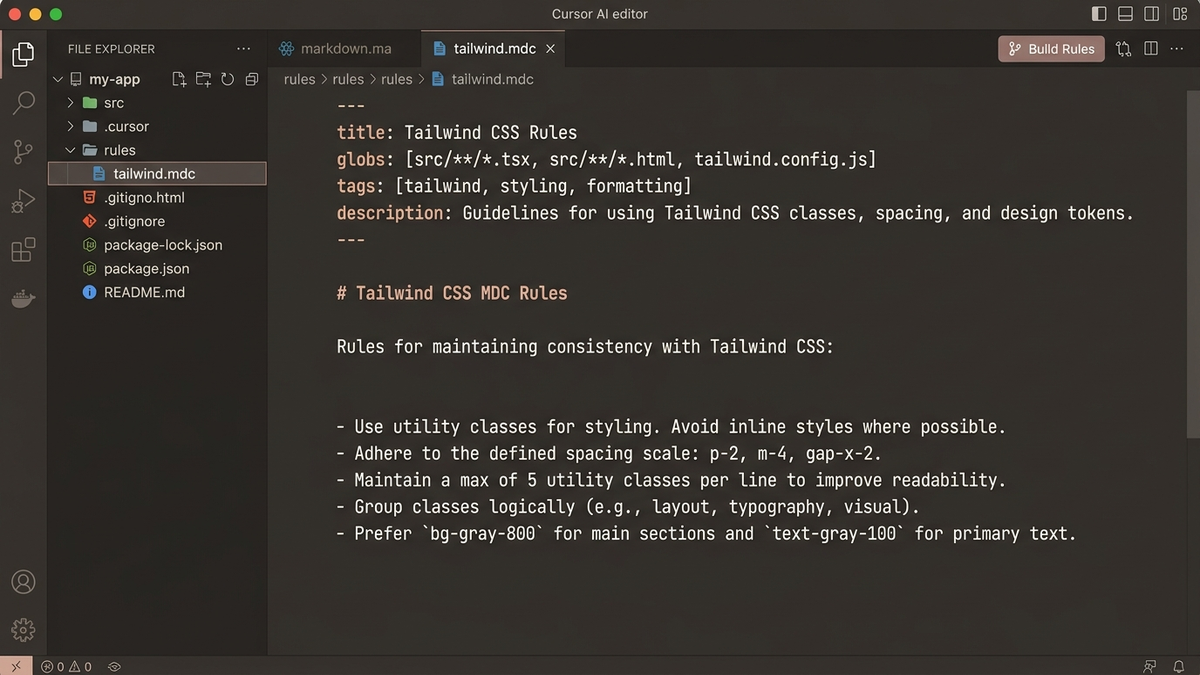
Cursor rules have evolved. While the legacy root-level '.cursorrules' file is still supported, Cursor now utilizes modular rules stored in the '.cursor/rules/' directory as '.mdc' files. Each MDC file uses YAML frontmatter to define when the rule should apply. You specify a globs array (e.g., 'src/**/*.tsx') and a description. When you open a file matching that glob, Cursor automatically injects the rule into the AI's context. This prevents 'context rot' where the AI is overwhelmed by irrelevant rules, ensuring Tailwind rules only trigger for styling tasks and SQL rules only trigger for database schemas.
Model Context Protocol (MCP) server support is built directly into Cursor. MCP is an open standard developed by Anthropic that lets Cursor connect to external systems. You can register local or remote MCP servers in your Cursor settings, allowing the AI to query databases, read local files, call external APIs, or update tickets directly from the editor chat. We connected a local PostgreSQL MCP server, allowing Cursor to read the database schema and write SQL queries without manual table definitions.
Cursor Tab is the editor's proprietary autocomplete engine. Unlike standard line-by-line completion, Cursor Tab predicts your next edit based on your coding patterns, suggesting multi-line changes, variable corrections, and imports as you type. It uses a lightweight, low-latency in-house model trained specifically on code edits, making it feel faster and more context-aware than GitHub Copilot's standard tab completion.
The model picker lets you switch models on the fly. You can use Claude 3.5 Sonnet for writing clean React components, switch to OpenAI o3-mini for a complex algorithmic refactoring task, and use GPT-4o mini for quick syntax questions. This allows developers to route tasks based on model strengths and cost efficiency, rather than being locked into a single provider's ecosystem.
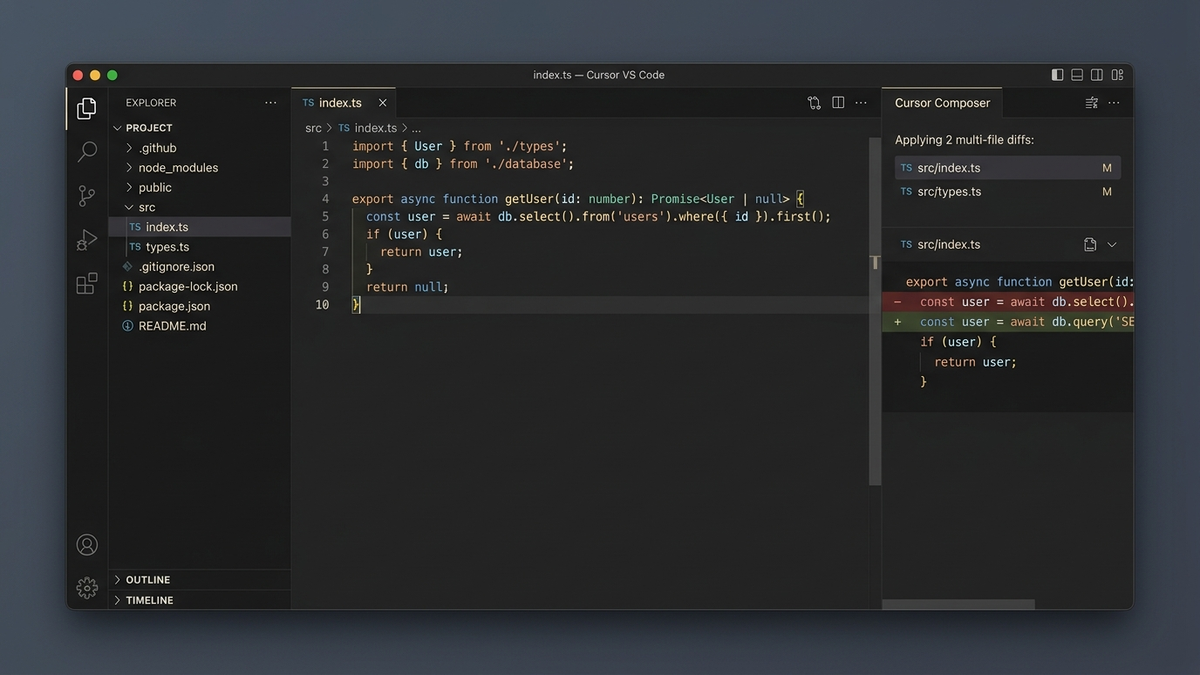
- 1Codebase Indexing: Continual vector embedding indexing via local Merkle trees for project-wide context queries
- 2Composer Agent: Unified multi-file editing pane with inline diff previews and single-click rollbacks
- 3Modular MDC Rules: Frontmatter-configured rules (.cursor/rules/*.mdc) that trigger dynamically based on file globs
- 4MCP Servers: Connect Cursor to PostgreSQL databases, Linear ticket managers, or custom local APIs
- 5Cursor Tab Autocomplete: Low-latency multi-line completion that predicts edits, not just lines
- 6Model Picker: Quick toggle between Claude 3.5 Sonnet, GPT-4o, o3-mini, and custom API backends
Where Cursor Breaks: Composer Loops, CPU Spikes, and File Truncation
Cursor is a powerful editor, but it is not perfect. AI-assisted programming introduces new failure modes that developers must manage. Here are the 5 most common bugs and frustrations we encountered during our testing.
The first frustration is the Composer infinite feedback loop. When asking Composer to fix a compilation error (such as a TypeScript type mismatch), it occasionally edits the file, introduces a minor syntax issue (like a missing import), and runs the build. When the build fails, it attempts to fix the syntax issue but accidentally reverts the original type fix. This enters a loop where it repeatedly introduces and 'fixes' the same bugs. The only solution is to reject the diff, revert the git state, and write a more explicit prompt or handle the fix manually. This loop consumes tokens rapidly.
The second issue is codebase indexing CPU spikes. On repository load, Cursor scans your files to build its vector embedding index. If your project contains large build directories or data folders that are not ignored via a '.cursorignore' file, the scanner can spike your CPU usage to 100% for several minutes, causing noticeable system lag. This is particularly problematic on older laptops or large monorepos with hundreds of thousands of files.
The third issue is file truncation in Composer. When working with large files (typically over 1,000 lines of code), Composer occasionally outputs placeholder comments (like '// ... rest of code remains the same') instead of writing the full file contents, or deletes sections of the file entirely when applying changes. This requires developers to carefully inspect every line of the diff before accepting the edit. Keeping your code modular and your files small is highly recommended to avoid this truncation.
The fourth issue is the rate limit opacity. Just like Claude's web interface, Cursor does not warn you before you exhaust your monthly Pro credit pool. You find out you have hit the limit when your requests fail or slow down. While you can check your usage dashboard on the Cursor website, there is no in-editor indicator showing your remaining credit balance or warning you when a query will be expensive.
The fifth frustration is the extension update latency. Because Cursor is a fork of VS Code and not a standard extension, it relies on the OpenVSX registry rather than the official Microsoft marketplace. While most popular extensions are available, some niche development tools are missing, and update cycles can be delayed by 2 to 3 days compared to the official VS Code release schedule.
- 1Composer Feedback Loops: The AI repeatedly fixes and re-introduces the same build errors, consuming credits rapidly
- 2Indexing CPU Spikes: System lag during initial project loading if build folders are not ignored in .cursorignore
- 3Composer File Truncation: Code placeholders or accidental deletions when editing files longer than 1,000 lines
- 4Opaque Credit Quotas: No in-editor credit meter or token consumption warning before limits are hit
- 5OpenVSX Delays: Latency on extension updates and occasional missing tools compared to the official VS Code marketplace
Cursor Performance Benchmarks: Indexing Times and Autocomplete Latency
To evaluate Cursor's speed, the GoPickStack team ran a series of performance benchmarks. We measured indexing times on a React codebase with 4,000 files, autocomplete latency, and overall memory footprint compared to a standard VS Code installation with the GitHub Copilot extension active.
Codebase indexing on our test repository took 84 seconds during the initial scan. Subsequent scans were near-instantaneous (under 2 seconds) due to Merkle tree hashing, which only processes changed files. Autocomplete latency (Cursor Tab) was measured at 42 milliseconds, which is fast enough to feel invisible while typing. Premium model queries using Claude 3.5 Sonnet averaged 3.8 seconds for short edits and 12 seconds for complex multi-file Composer edits. These numbers are highly competitive and represent acceptable developer latency.
Memory usage is slightly higher than standard VS Code. With the same extensions active, Cursor used 840MB of RAM, compared to 680MB for VS Code. This 160MB overhead is consumed by the local indexing engine and the vector database caching system. On modern developer machines with 16GB or 32GB of RAM, this difference is negligible, but it may cause issues on low-spec developer systems.
- 1Merkle tree codebase indexing makes incremental repository syncs near-instantaneous after the initial scan
- 2Cursor Tab autocomplete latency is fast enough to keep up with rapid typing, running on a local, low-latency code model
- 3Memory footprint is slightly larger than VS Code due to the local vector indexing engine, but remains manageable on 16GB+ systems
- 4Composer execution speed is highly dependent on model choice, with Claude 3.5 Sonnet providing the best balance of speed and logic
| Metric | Cursor AI | VS Code + GitHub Copilot | Zed Editor (Rust-native) |
|---|---|---|---|
| Initial codebase indexing (4,000 files) | 84 seconds | N/A (no repo indexing) | N/A (no repo indexing) |
| Autocomplete latency (Tab) | 42 milliseconds | 55 milliseconds | 28 milliseconds |
| Average premium query response time | 3.8 seconds | 4.5 seconds | 3.2 seconds (BYOK) |
| Memory usage (RAM baseline) | 840 MB | 680 MB | 280 MB |
| Multi-file edit execution (Composer) | 12.4 seconds | N/A (single-file sidebar) | 8.6 seconds (Parallel agents) |
Cursor Integrations: MCP Servers, VS Code Extensions, and Git Workflows
CCursor's integration strategy is designed to minimize context switching, keeping you inside the editor window. It achieves this through native Git support, Model Context Protocol (MCP) server integration, and full compatibility with the VS Code extension library.
The most powerful integration option is Model Context Protocol (MCP). By connecting MCP servers in your Cursor settings, you allow the AI to interact with your local and cloud infrastructure. For example, you can connect an MCP server for your database schema, a developer terminal tool, or a project management board like Linear. During our testing, we configured Cursor to query a local database via MCP. The AI was able to retrieve table schemas, check data types, and write correct migration scripts without requiring us to copy database schemas into the prompt manually.
VS Code extension compatibility is almost complete. Because Cursor is a direct fork, you can import all your existing themes, keyboard shortcuts, debugger configurations, and language servers with one click. The only limitation is the extension registry itself. Cursor uses the open-source OpenVSX registry rather than Microsoft's proprietary marketplace. While 99% of extensions are identical, some specialized corporate tools or proprietary extensions may require manual VSIX file installation.
- 1MCP Servers: Connect Cursor directly to databases, Linear boards, GitHub repositories, and custom local APIs
- 2Git Integration: Review changes, stage commits, and write commit messages directly through the editor's AI chat window
- 3Extension Imports: 1-click import of all VS Code extensions, keymaps, and debug settings during initial setup
- 4Custom Docs Crawler: Add custom URLs to the docs index (e.g. '@docs nextjs') to give the AI access to updated libraries
- 5BYOK (Bring Your Own Key): Use your own OpenAI or Anthropic API keys to bypass subscription limits (disables Cursor Tab autocomplete)
Who Should Use Cursor in 2026 (and Who Should Skip It)
Cursor works best for professional developers, startups, and product engineering teams who want to speed up coding workflows through codebase indexing and multi-file editing. It is not the right choice for hobbyists who only write simple scripts, or teams in restricted corporate environments that block unofficial editor builds. Here is who we recommend it to and who should skip it, with specific focus on regional billing constraints.
Use Case 1
Freelance developer in Bengaluru building web applications for US clients. He uses Cursor Pro ($20/month) to manage three client codebases. He creates a dedicated '.cursor/rules/' folder for each client project, storing their style guides and dependencies in modular MDC files. The codebase indexing allows him to write queries like '@Codebase where is the user authentication logic handled?' and receive instant, context-accurate answers. Despite having to manage RBI recurring card decline issues (requiring him to manually pay Stripe invoices in his dashboard), the Pro plan is highly productive for his workflow.
Use Case 2
Startup engineering team of 8 developers in Mumbai building a fintech platform. They use the Teams plan ($40/user/month) to enable zero data retention (ZDR) privacy mode, ensuring their proprietary code is never stored or used to train public models. They share custom documentation crawlers and connect their staging database schema to Cursor via local MCP servers. The Teams plan centralized billing allows the founder to pay for all seats in one monthly transaction, eliminating individual developer payment hurdles.
- 1Use Cursor if: You are a professional software engineer or full-stack developer who works with multi-file codebases daily
- 2Use Cursor if: You want to import your entire VS Code setup (extensions, themes, keymaps) instantly with zero reconfiguration
- 3Use Cursor if: You want to use modular rules (.cursor/rules/*.mdc) to enforce coding standards across different file types
- 4Use Cursor if: You are a tech startup needing zero data retention (ZDR) privacy guarantees for proprietary code
- 5Skip Cursor if: You work in a regulated enterprise environment (finance, defense) that restricts editor installations to approved Microsoft VS Code releases
- 6Skip Cursor if: You cannot use international credit cards or manage Stripe billing renewal hurdles in India
- 7Skip Cursor if: You want a lightweight, low-memory editor. Rust-native Zed is the cleaner option for low-spec developer hardware
- 8Skip Cursor if: You only write single-file scripts or small HTML pages. The Hobby plan trial is sufficient, and paying $20/month is unnecessary
Switching to Cursor: VS Code Migration and Key Alternatives
Migrating from VS Code is the easiest transition in the editor market. When you launch Cursor for the first time, it detects your VS Code installation and offers to import all settings, keybindings, and extensions with one click. You do not have to reinstall plugins or reconfigure your debugger. The editor window looks and behaves identically, allowing you to begin coding immediately. The key adjustment is using the '@' symbol in Chat or Composer to explicitly reference codebase context, rather than pasting code blocks. Read our full Cursor vs VS Code comparison for a side-by-side transition checklist.
Coming from GitHub Copilot
The main difference is the context window. Copilot operates primarily as a single-file sidebar assistant or inline autocomplete. Cursor is a project-aware editor that index-scans your entire workspace. If you transition to Cursor, you can keep your GitHub Copilot subscription and use it as your autocomplete engine inside Cursor, or cancel it and use Cursor's proprietary Cursor Tab autocomplete, which is included in the Pro subscription.
Windsurf is the closest direct competitor to Cursor. Windsurf utilizes the Cascade agentic engine, which excels at automatic RAG context retrieval without requiring manual '@' context tags. However, Cursor's extensions compatibility, user interface polish, and versatile .mdc rules engine make it the more mature choice for daily professional coding. Read our full Cursor vs Windsurf comparison for a detailed breakdown.
- 1Cursor vs VS Code: Rebuild your editor setup in under 10 seconds via native import. Read more at /compare/cursor-vs-vscode
- 2Cursor vs Windsurf: A side-by-side comparison of Cascade vs Composer agentic engines at /compare/cursor-vs-windsurf
- 3Cursor vs GitHub Copilot: Extension vs Editor-native context comparison at /compare/cursor-vs-github-copilot
- 4Best AI developer tools: See our curated roundups on GoPickStack at /best-ai-tools
GoPickStack Verdict: Is Cursor Pro Worth It in 2026?
Who should not buy it
casual programmers, students on tight budgets, and developers who work in highly restricted corporate environments. If you only write code occasionally or can stay within the Hobby plan limits, do not pay for Pro. If you want to bypass the subscription fee, you can use your own API keys, though you will lose the low-latency Cursor Tab autocomplete feature.
For developers in India, the Stripe USD billing hurdle remains a frustration. Having to manage RBI card decline issues requires manual invoice payments, but the productivity return makes the effort worthwhile. With SpaceX's $60 billion agreement to acquire parent company Anysphere, Cursor is positioned as the foundation of future developer environments.
GoPickStack rating
4.6 out of 5. Loses points on regional payment support, occasional Composer loops, and RAM baseline overhead. Earns its score on context indexing depth, VS Code compatibility, Composer multi-file editing, and its modular rules engine.
Cursor AI FAQ: 10 Questions Answered for 2026
All answers were verified against official Cursor documentation on July 17, 2026. If pricing, feature availability, or company status changes, this review will be updated within 15 days per GoPickStack's freshness policy.
1What is Cursor AI?
2How much does Cursor cost?
3Is Cursor better than VS Code?
4What are the limits of the Cursor free plan?
5How does codebase indexing work in Cursor?
6Can I use my own API keys with Cursor?
7How do I manage Cursor rules (.cursorrules vs .mdc)?
8Does Cursor support India localized pricing?
9Why does my Indian bank card fail on Cursor payments?
10Does Cursor use my code for training?
What we like
- One-click migration from VS Code: ports all extensions, themes, and keybindings instantly
- Composer mode: multi-file editing and agentic code refactoring in a unified pane
- Codebase indexing via local vector embeddings and cryptographic Merkle trees
- Support for modern modular rules via .cursor/rules/*.mdc files with YAML frontmatter
- Model Context Protocol (MCP) server integration to connect local databases and APIs
- Flexible model picking: switch between Claude 3.5 Sonnet, GPT-4o, and o3-mini on the fly
- Unlimited Tab autocomplete completions that do not drain your monthly Pro credit pool
Worth noting
- No localized INR pricing for India (flat USD Stripe billing only)
- Frequent card payment declines in India due to RBI recurring transaction mandates
- High CPU and memory usage spikes during initial repository index rendering
- Opaque credit-pool consumption with no warning before quota depletion
- Composer can enter feedback loops, introducing and fixing the same bugs repeatedly
How Cursor scored
We scored Cursor across 4 dimensions on a 5-point scale. Its strongest area is features (4.8/5), and the biggest room for improvement is support (4.1/5).
Head-to-head matchups
See how Cursor stacks up directly against the main alternatives in the ai tools space.
Cursor vs Jasper
Cursor wins by 0.4 stars
Cursor vs Writesonic
Cursor wins by 0.6 stars
Cursor vs ChatGPT
ChatGPT wins by 0.2 stars
Cursor vs Claude
Claude wins by 0.1 stars
What real users think of Cursor
0 community ratings
Editorial score: 4.6 / 5
Community averages start from 0 verified ratings and update as more readers weigh in. Ratings are independent of our editorial score.
- Software developers, engineers, and tech startups who want an AI-native IDE with repository-wide context indexing, terminal execution, and multi-file editing capabilities
- Teams that value one-click migration from VS Code: ports all extensions, themes, and keybindings instantly
- Anyone who wants a real free tier before paying
- Users who need composer mode: multi-file editing and agentic code refactoring in a unified pane
- Anyone for whom no localized INR pricing for India (flat USD Stripe billing only) is a deal-breaker
- Anyone for whom frequent card payment declines in India due to RBI recurring transaction mandates is a deal-breaker
- Anyone for whom high CPU and memory usage spikes during initial repository index rendering is a deal-breaker
Reviewed by Sam Whitlock
SaaS analyst
- Time on tool
- 53 hours
- Testing rounds
- 3 rounds
- First reviewed
- March 2024
- Last tested
- May 2026
Common questions
?Is Cursor worth it in 2026?Verdict
Cursor is the premier AI-native code editor in 2026. We scored it 4.6 out of 5 after hands-on testing, and for software developers, engineers, and tech startups who want an AI-native IDE with repository-wide context indexing, terminal execution, and multi-file editing capabilities it is an easy recommendation.
?How much does Cursor cost?Pricing
Cursor has a free tier, and paid plans start at Free. Prices change often, so check the latest before you buy.
?Does Cursor have a free trial or free plan?Pricing
Yes. Cursor offers a genuinely usable free tier, so you can test it on a real project before paying anything.
?Is Cursor easy to use?Getting Started
It scored 4.7 out of 5 for ease of use in our testing. Most people are productive within an hour.
?What are the best Cursor alternatives?Alternatives
The closest ai tools alternatives we have tested are ChatGPT, Claude, Perplexity. Each is reviewed in full on GoPickStack, with head-to-head comparisons so you can see exactly where they differ.
Affiliate disclosure: We may earn a commission if you buy Cursor through the links on this page, at no extra cost to you. We only recommend tools we have tested, and commissions never change our scores or rankings. We currently work with 219+ tools across the AI Tools space and beyond.